Gym management software for Bangladesh

Run your gym’s front desk without the paper register.

Liftuno keeps members, dues, payments, attendance and the day’s cash in one place — in Bangla or English, on the phone you already use.

No sign-up. Look around a fictional gym as its owner, front desk or a member.

  • Web app — live now
  • Android — publishing to Google Play
  • Windows — publishing to Microsoft Store
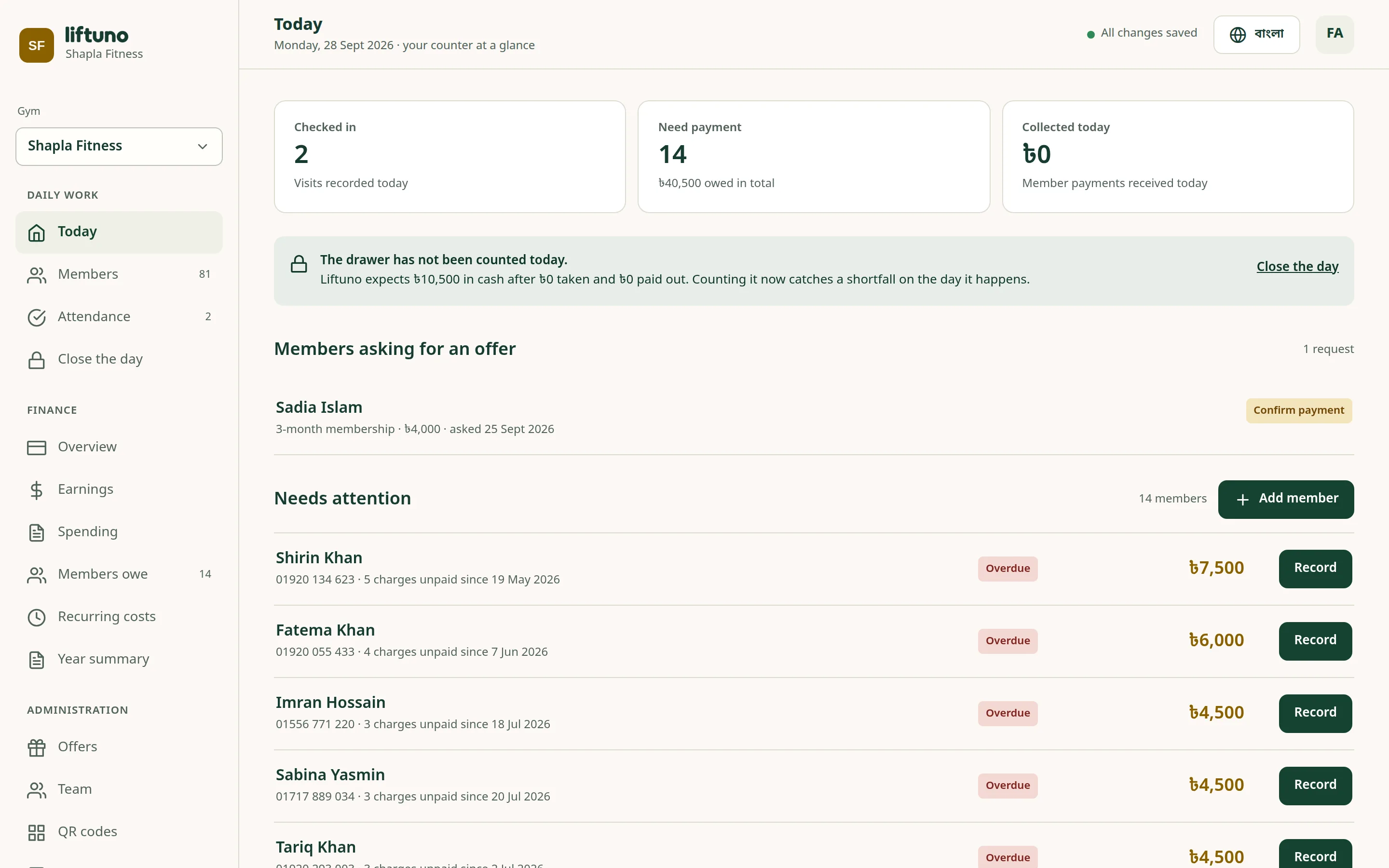
Liftuno’s Today screen showing check-ins, members who need to pay and cash collected
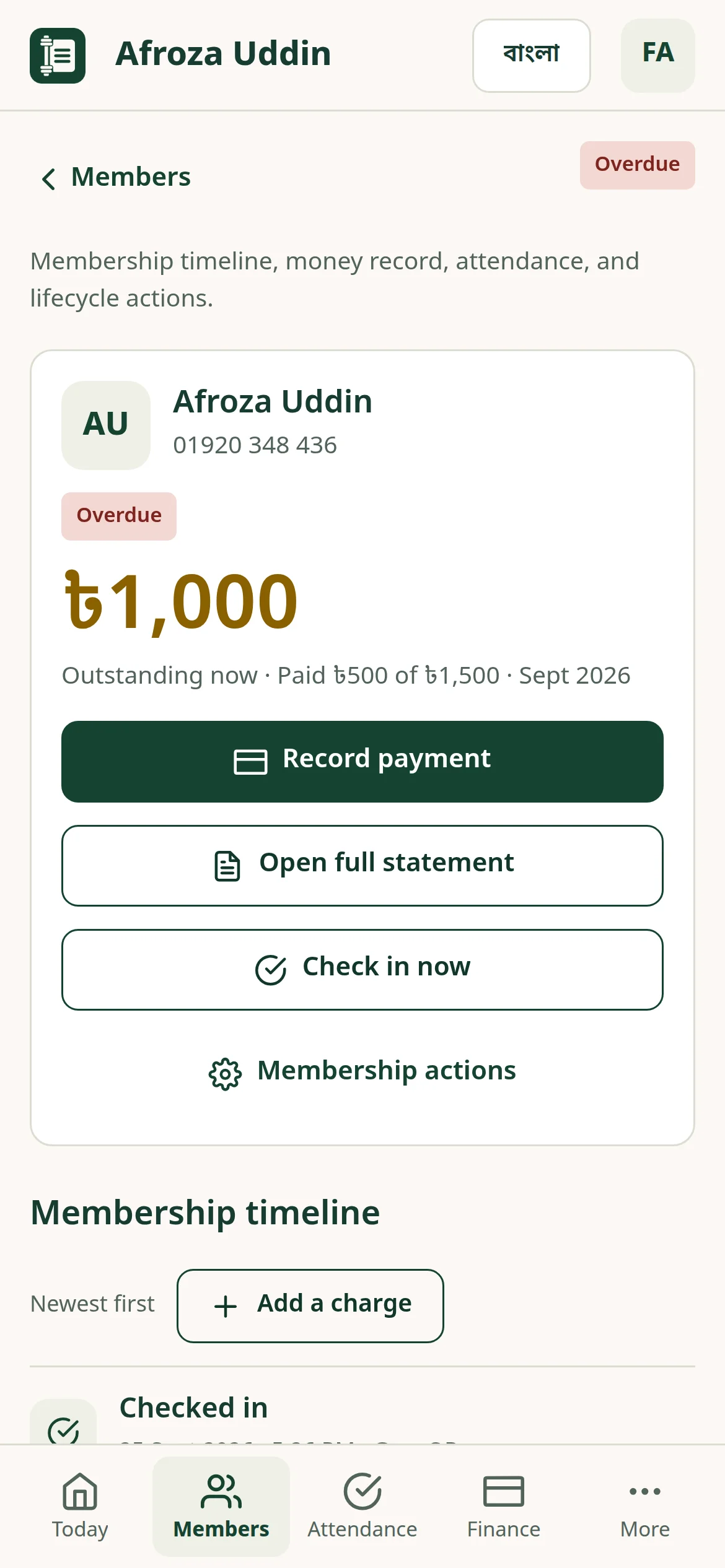
A member’s record in Liftuno on a phone, showing the outstanding balance and a Record payment button

Screens show a fictional demo gym.

Why gyms switch

The register book did its job. Your gym has outgrown it.

With a paper register

  • Dues live in someone’s memory or on the back page
  • Part payments nobody can add up at month end
  • A cash drawer that doesn’t match the day
  • No proof when a member asks “did I pay?”

With Liftuno

  • Every member’s balance, worked out the same way every time
  • Part payments, offers and discounts — each with a reason
  • A day close that says what the drawer should hold
  • A receipt for every payment, ready to share

What Liftuno does

Everything the front desk handles, in one app

Designed around how local gyms actually run: monthly fees, part payments, cash and bKash.

Members & dues

Know who has paid, who owes and who stopped coming

Add a member with just a name and mobile number. Liftuno works out coverage and balances from the monthly fee, so the list always tells the truth.

  • Filter by paid up, needs payment, renewal due, paused or ended
  • A full timeline for every member: charges, payments and visits
  • Members who stop coming aren’t charged for months they didn’t use
  • Search by name, mobile number or member ID
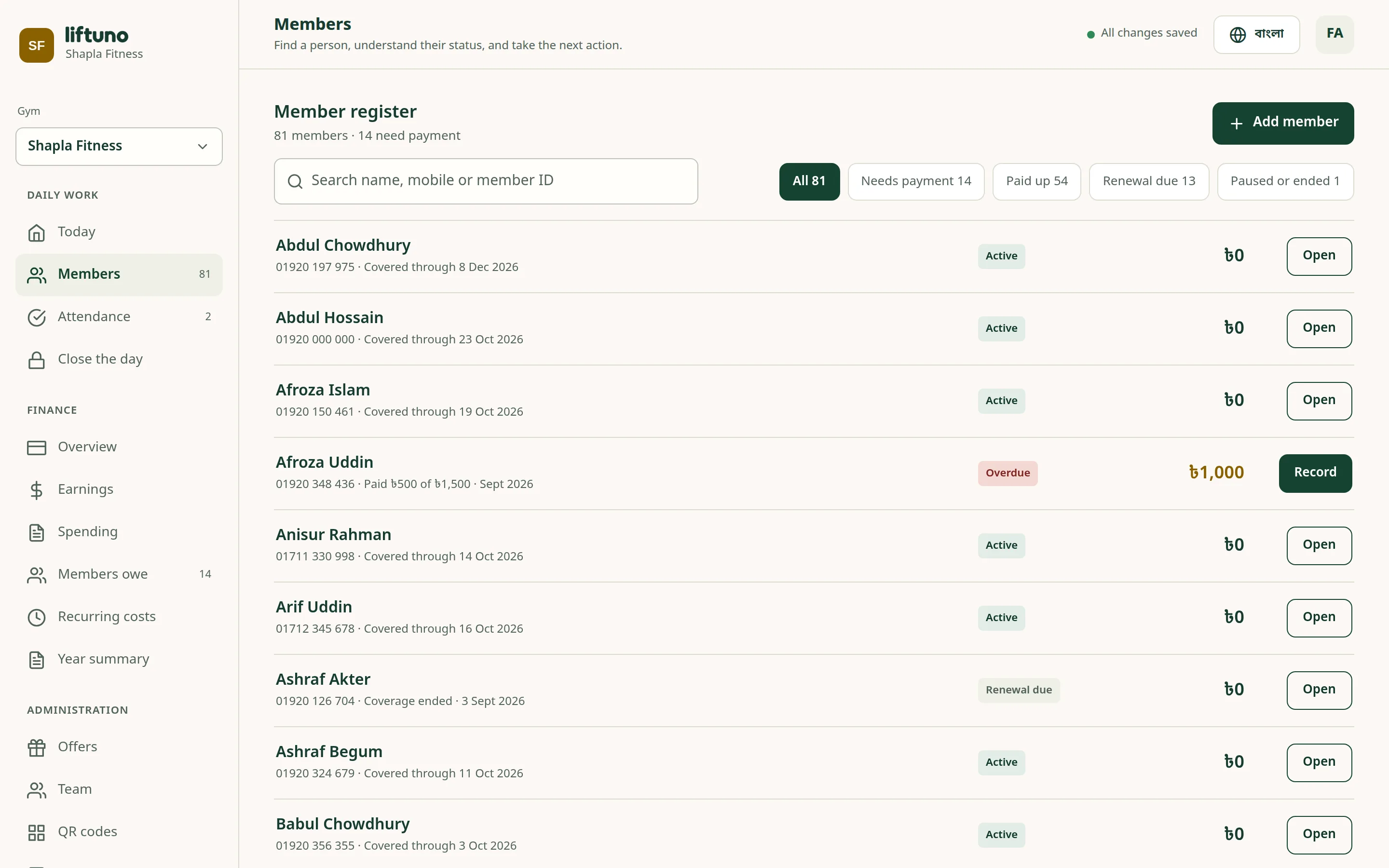
Member register listing members with their status and balance
A member’s record on a phone

Payments & receipts

Take full or part payments and hand over a receipt in seconds

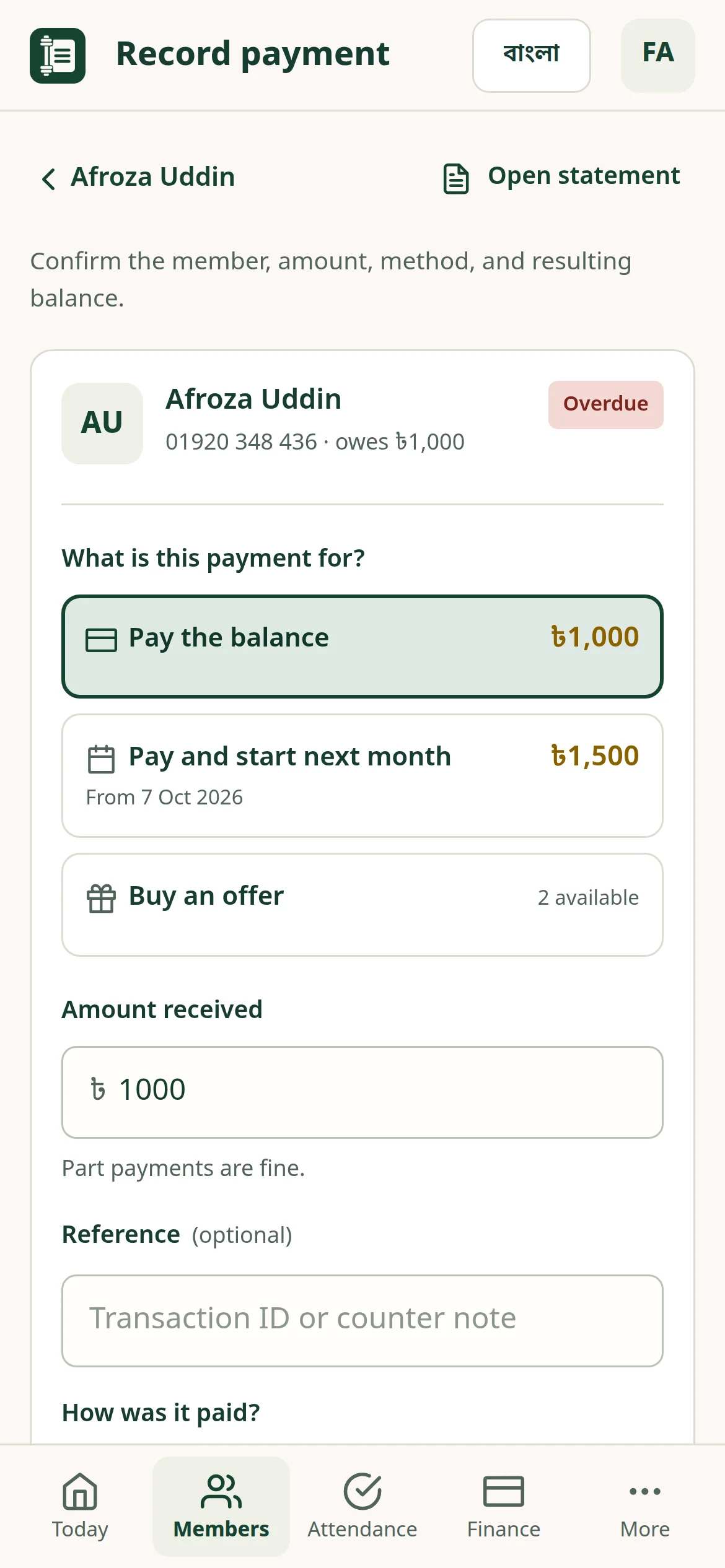
Choose what the payment is for, enter the amount and how it was paid. Liftuno shows the new balance and creates the receipt.

  • Cash, bKash or bank transfer, with an optional transaction ID
  • Part payments, discounts and write-offs — each with a reason
  • Prepaid multi-month offers members can buy
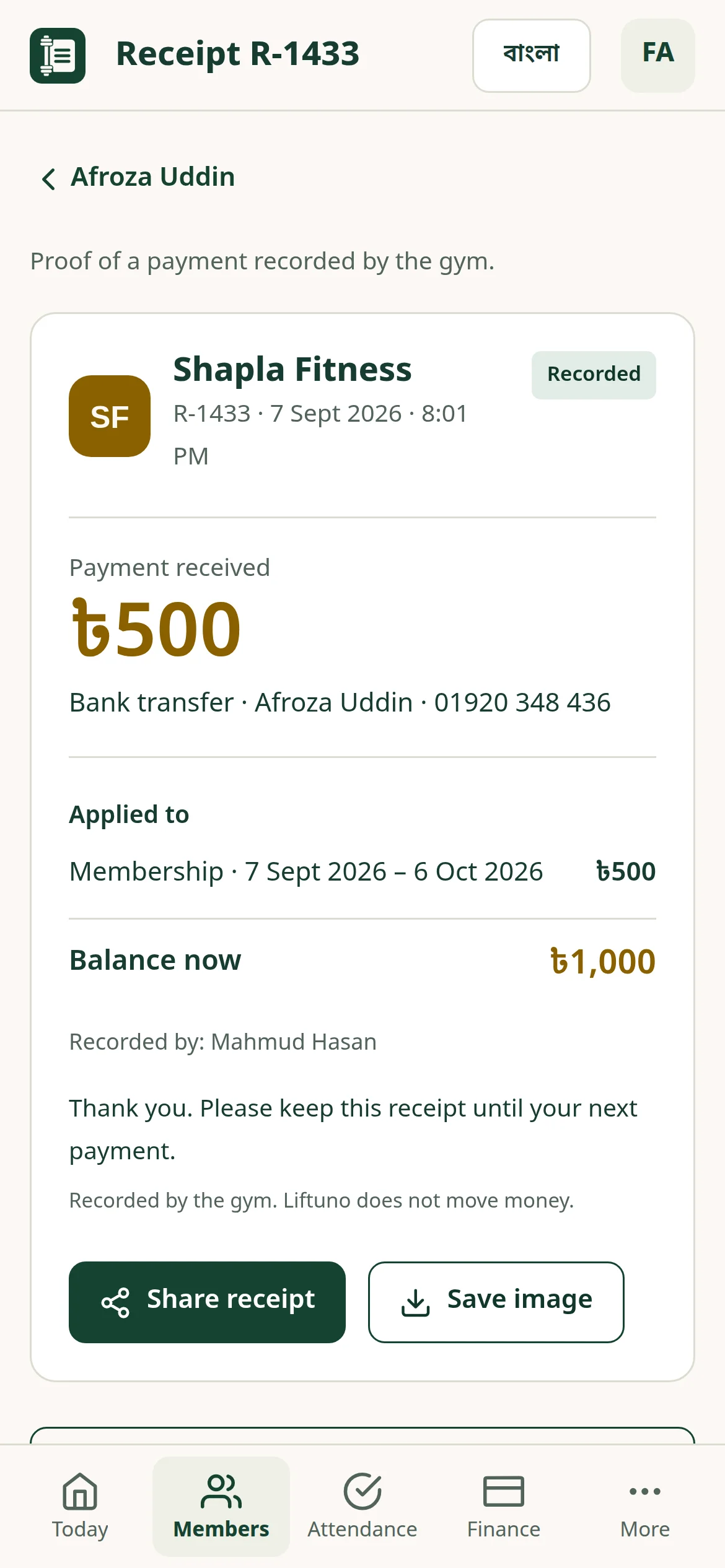
  • Receipts carry your gym’s logo; share them or save as an image
  • Mistakes are reversed, never erased, so history stays honest
Record payment screen with options to pay the balance, start next month or buy an offer
A payment receipt with the gym’s logo, amount and new balance

Attendance & QR check-in

Members check themselves in with one scan

Print your gym’s QR code for the entrance. Members scan it with their phone camera and the visit is recorded — or the desk checks them in by name.

  • One printable QR code for the entrance
  • Desk check-in by name, mobile or member ID
  • A second scan the same day is ignored, not double-counted
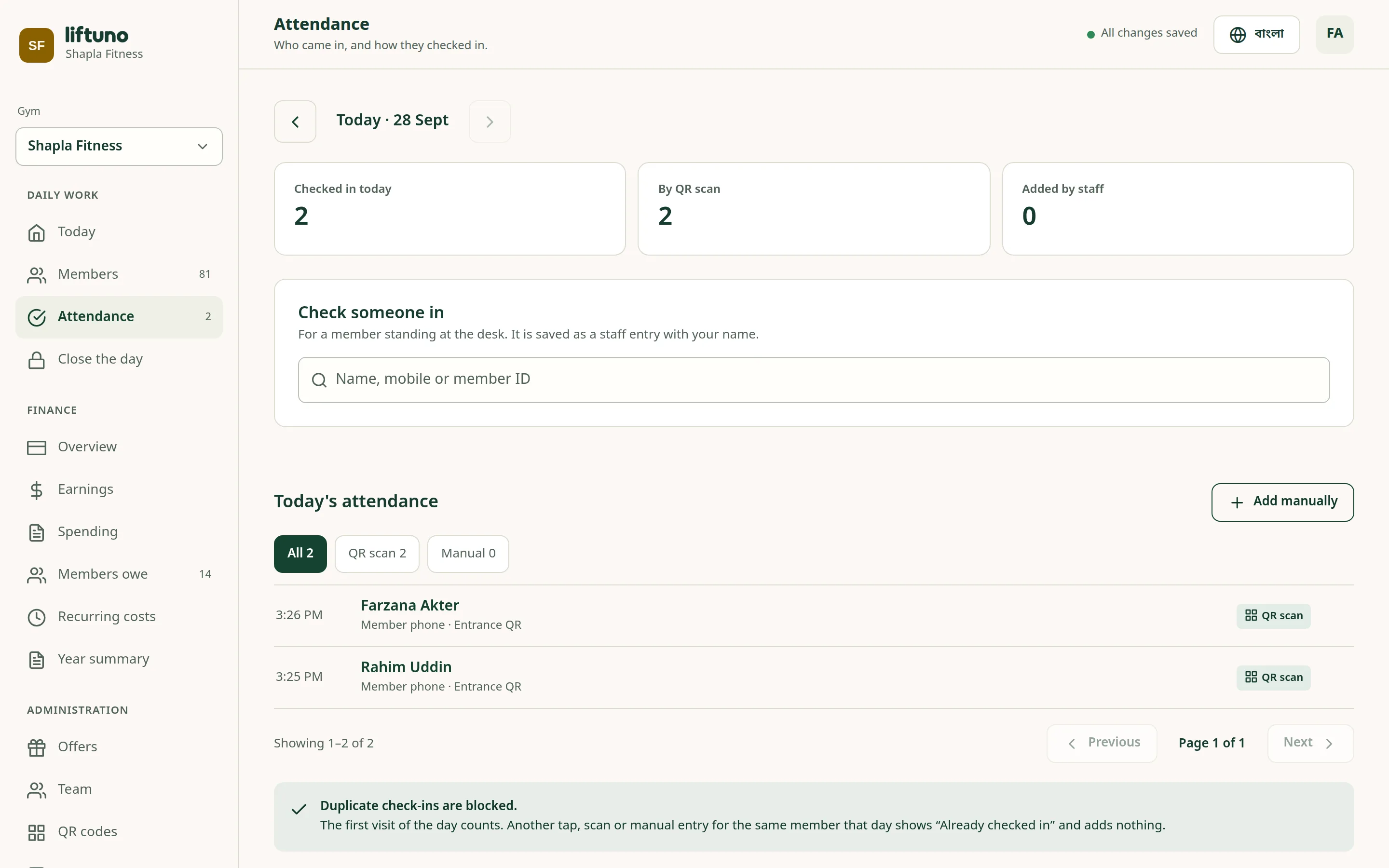
  • Daily totals split by QR scan and staff entry
Attendance screen showing today’s check-ins by QR scan and by staff

Close the day & finance

See what the drawer should hold, and what the gym really earned

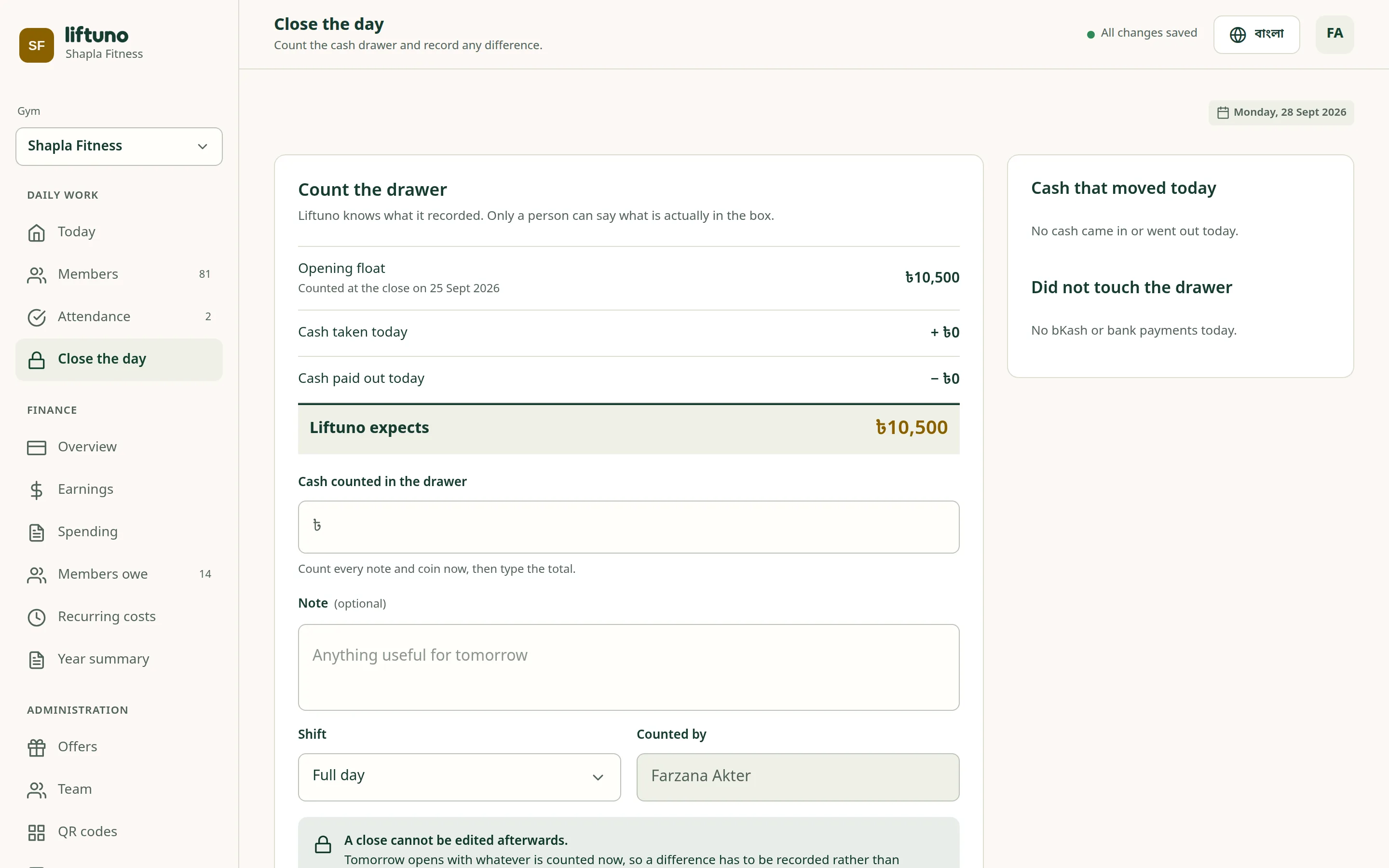
At the end of a shift, count the drawer. Liftuno already knows what should be there, so a shortfall is caught the same day — not at month end.

  • Day close by full day, morning or evening shift; differences need a note
  • Spending with a photo of the bill, paid or still owed
  • Other income: day passes, personal training, lockers and sales
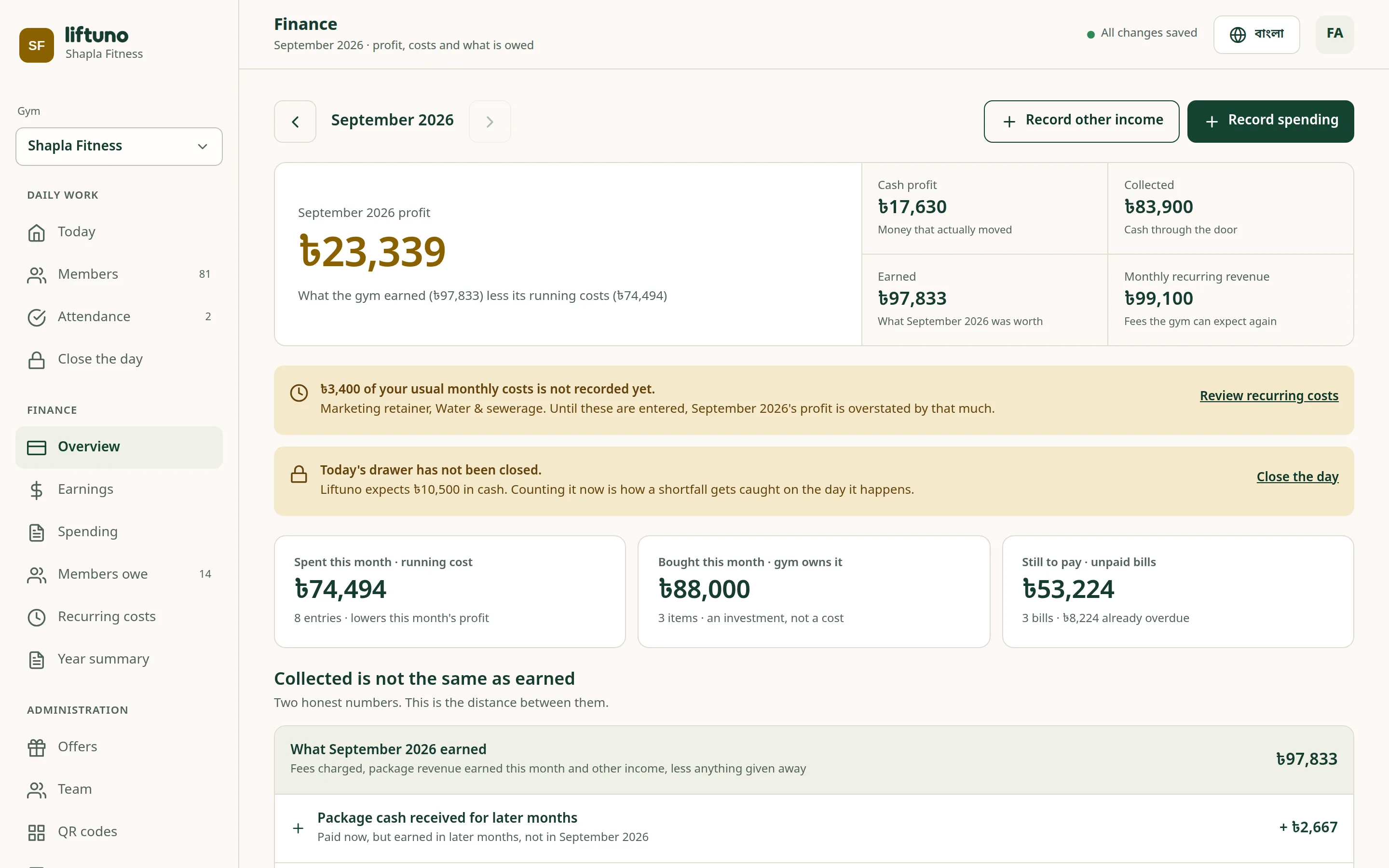
  • Recurring costs, money members owe and a year summary
  • Export to CSV, or print and save as PDF
Finance overview with the month’s profit, money collected, spending and unpaid bills
Close the day screen comparing expected cash with the counted drawer

Team & permissions

Give each staff member only what they need

Add staff by mobile number and choose what they can do. Owners see everything; the front desk sees the day’s work.

  • Seven permissions: members, payments, attendance, money, offers, team and settings
  • Nobody can give away a permission they don’t have
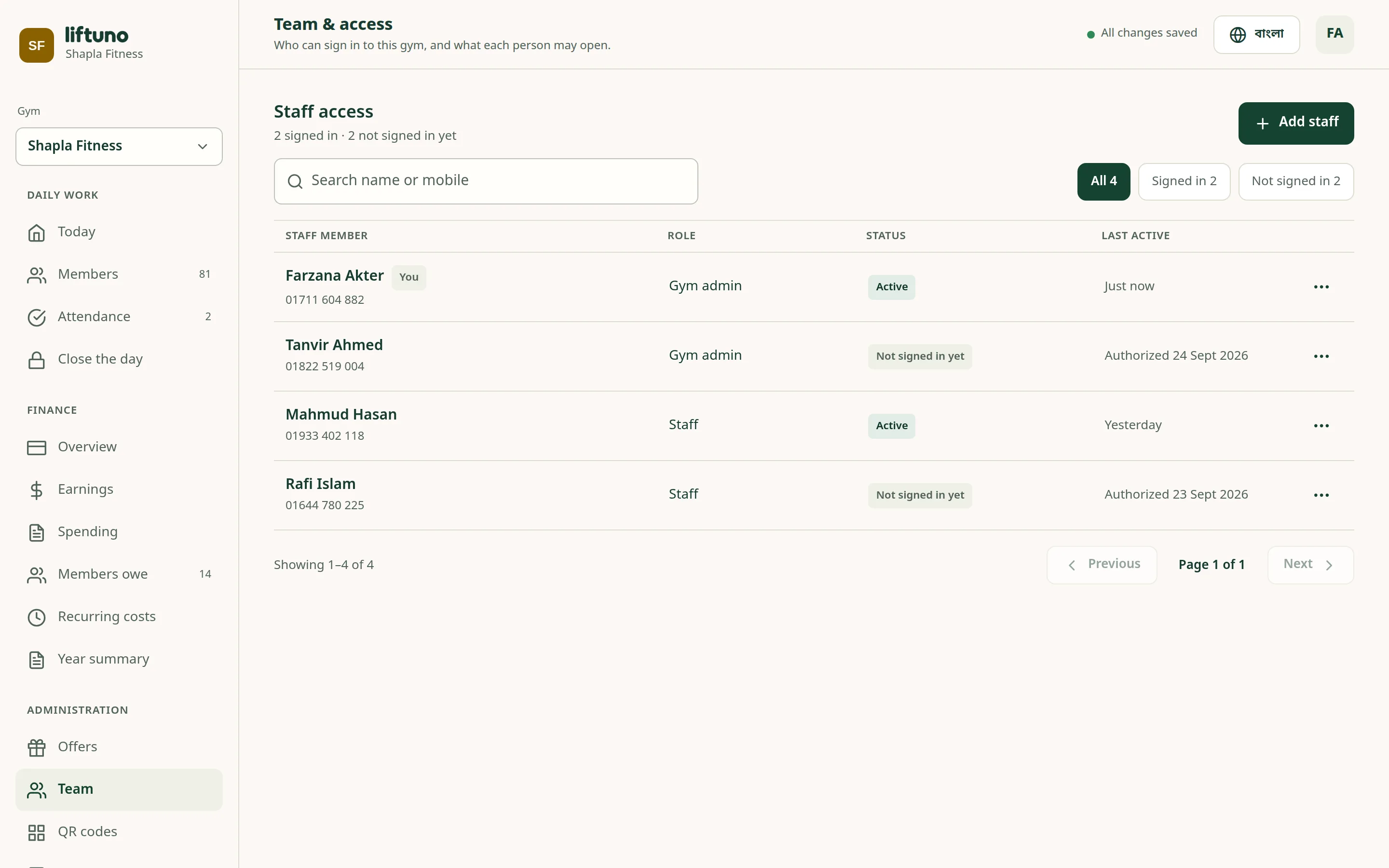
  • See who has signed in and when they were last active
  • Every action is recorded with who did it and when
Team and access screen listing staff members, roles and last activity

The member app

Members see their own membership without calling the desk

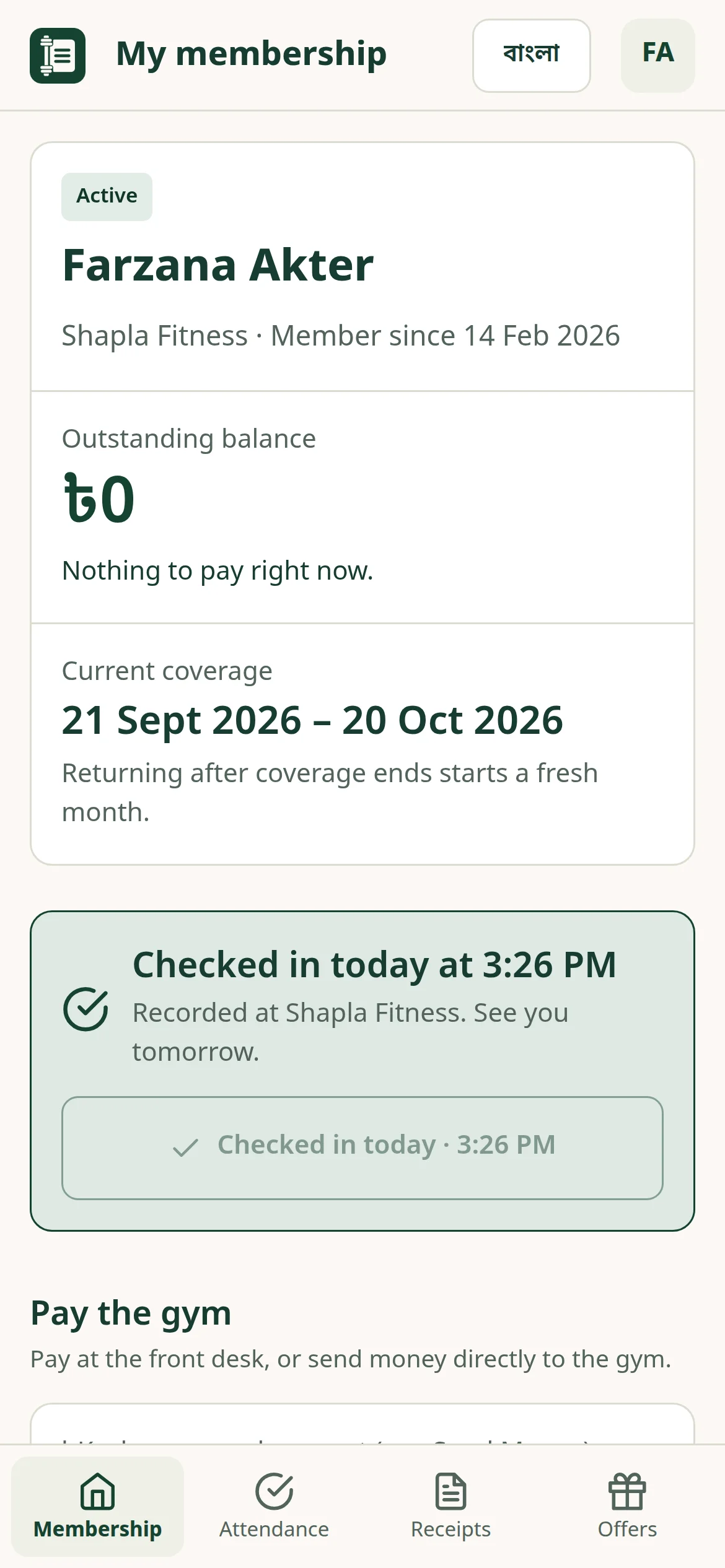
Members sign in with their mobile number and a six-digit PIN. They see what they owe, keep their receipts and check in from their own phone.

  • Coverage dates, balance and every receipt
  • Visit history and one-tap check-in
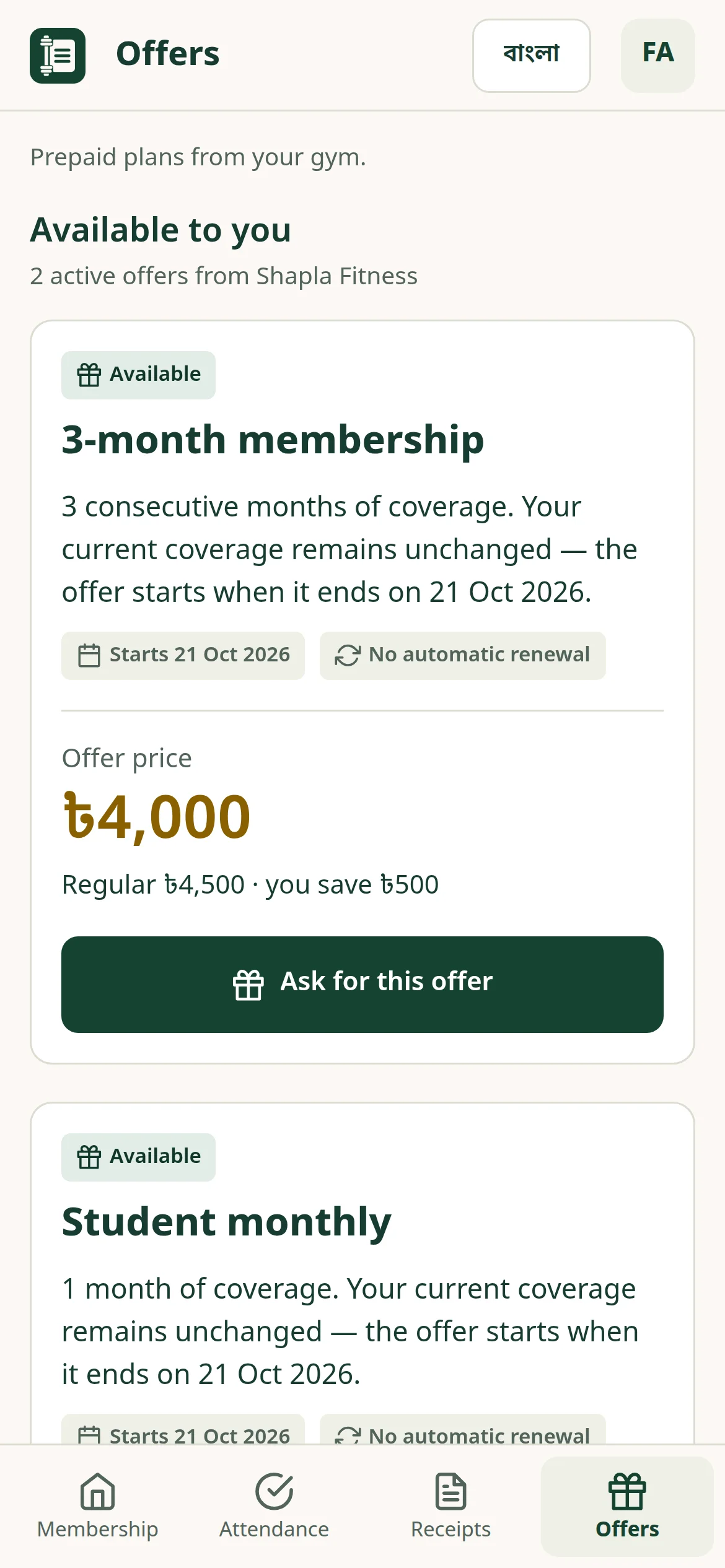
  • Browse your offers and ask for one
  • Copy the gym’s bKash number to pay
A member’s own membership screen showing balance and coverage
Offers screen in the member app

SMS in BanglaRolling out

Remind members about dues, in their own language

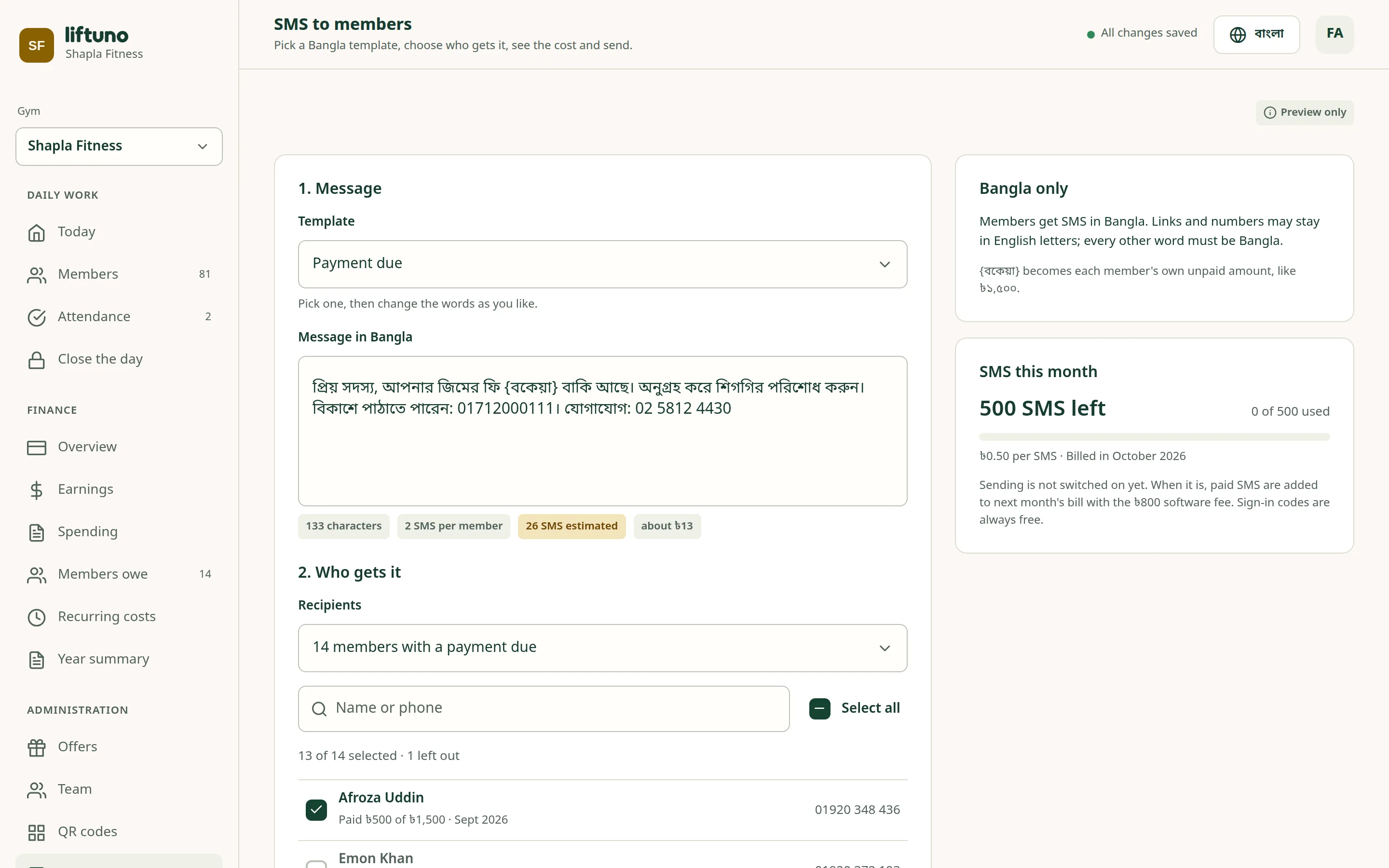
Pick a ready-made Bangla template, choose who gets it and see the cost before you send. Each member’s own amount is filled in.

  • Templates for payment due, renewal, offers, closures and notices
  • Send to everyone who owes, or pick people by hand
  • Paid SMS are added to your next monthly bill
  • Sign-in codes are always free
SMS screen with a Bangla payment-due message and the list of recipients

বাংলা and English

Fully in Bangla, whenever you want it

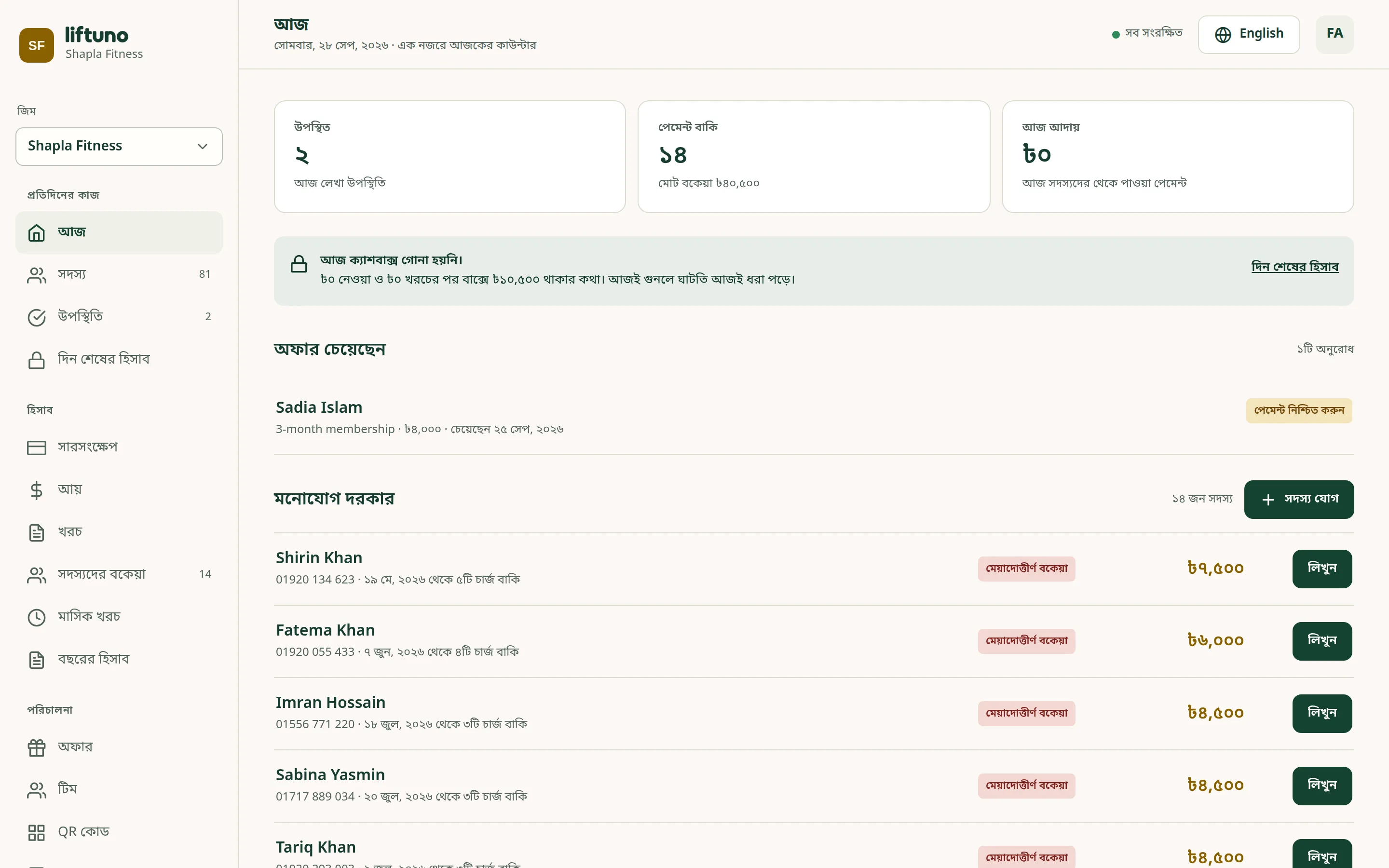
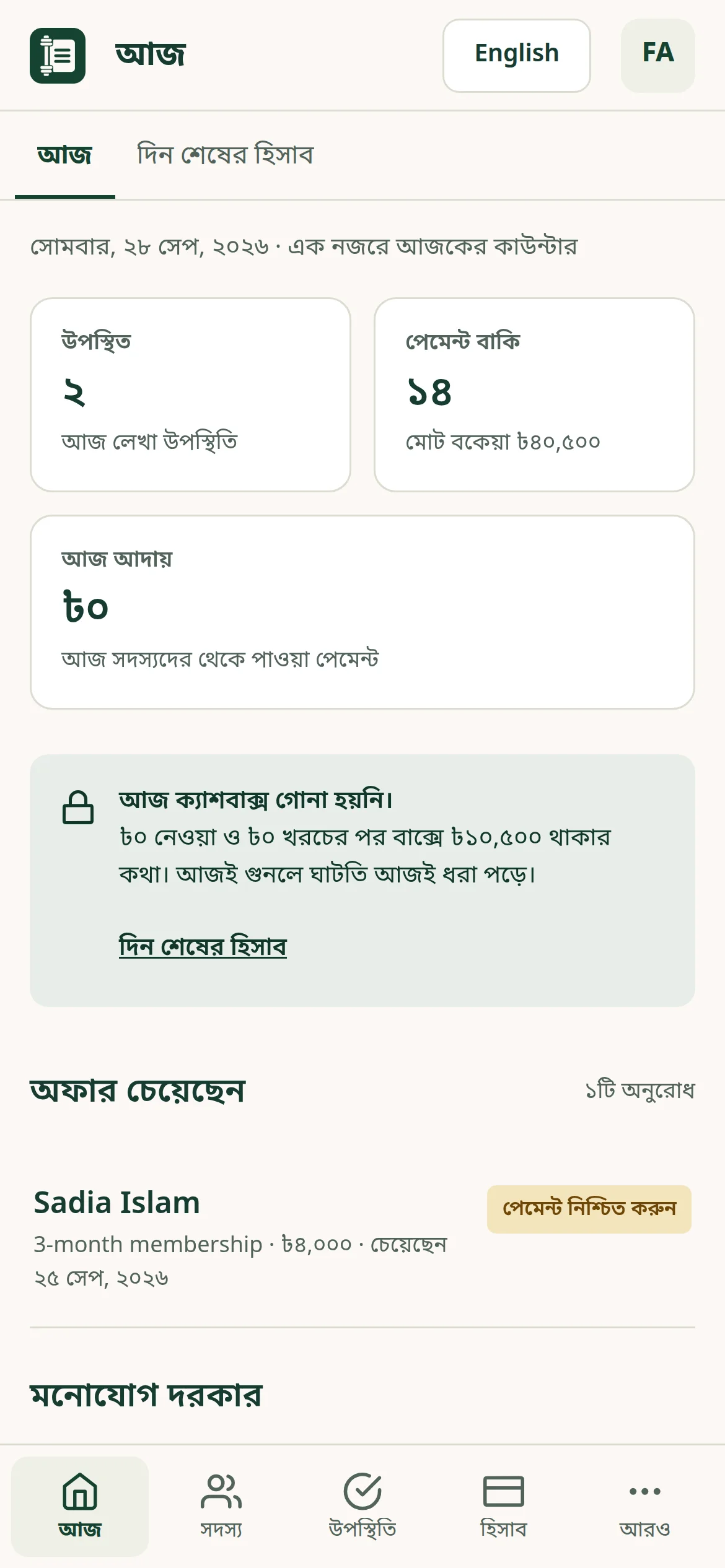
Switch any screen between English and বাংলা. Each person picks their own language, and numbers, dates and money read naturally in both.

Liftuno’s Today screen in Bangla

The details that matter at a real front desk

  • Simple sign-in

    A mobile number and a six-digit PIN. First time or forgot the PIN? A code arrives by SMS.

  • Login codes

    No SMS? The gym can hand over a one-time code so the person sets their own PIN.

  • One number, several profiles

    An owner who trains elsewhere, or a family sharing a phone, simply picks the right profile.

  • Activity history

    Every change is recorded with who made it. Search it by type and date, or export it.

  • Your logo on receipts

    Upload your gym’s logo once and it appears on every receipt you share.

  • Each gym kept separate

    Every gym’s records are isolated. Staff only ever see the gym they work for.

Who it’s for

Built for everyone at the counter

  • Gym owners

    See collections, spending, profit and what members owe. Decide who on the team can do what.

  • Front desk

    Record payments and check-ins quickly, with the balance worked out for you.

  • Members

    Check in, see what they owe and keep their receipts — on their own phone.

Apps

Use it on the web today. Android and Windows are on the way.

One account and the same data on every device.

  • Available now

    Web app

    Works in any modern browser on a phone, tablet or computer. Nothing to install.

    Open the web app
  • Publishing

    Android app

    Our Android app is being published on Google Play. We’ll add the download link here as soon as it’s live.

  • Publishing

    Windows app

    A desktop app for the front-desk computer, for Windows 10 and 11. It’s being published on the Microsoft Store.

We’ll update this page as each store listing goes live.

Pricing

Contact us for pricing

We’re finalising our plans. Tell us about your gym and we’ll share pricing with you directly.

Get a price for your gym

Email us your gym’s name and roughly how many members you have. We reply personally.

Everything included

  • Members, payments, receipts and attendance
  • Finance, day close and reports
  • Staff accounts with permissions
  • The member app
  • Bangla and English
  • Web, Android and Windows apps

FAQ

Questions gym owners ask

Does Liftuno need an internet connection?

Yes. Liftuno saves everything online so every device sees the same numbers. If the connection drops, the app says clearly that nothing is being saved until you’re back online.

Can my staff use it in Bangla?

Yes. Every screen works in Bangla and English, and each person picks their own language.

Do my members have to use the app?

No. You can run everything from the front desk. Members who want to can sign in to check in, see their balance and keep their receipts.

Does Liftuno take payments online?

No. Members pay you the way they do today — cash, bKash or bank transfer — and you record it in Liftuno. Liftuno never handles the money.

Is our data safe?

Each gym’s records are kept separate, PINs lock after repeated wrong attempts, and every change is logged with who made it. Our privacy policy explains exactly what we store.

Is there an iPhone app?

Not yet. iPhone and iPad users can use the web app in Safari, which works the same way.

How do we get started?

Contact us. We set up your gym and your admin account, and help you bring your existing members over — including what each person already owes.

Put the register book away.

Tell us about your gym and we’ll set Liftuno up with you.